THIRD-PERSON RUNWAY
Guide the mermaid down the track
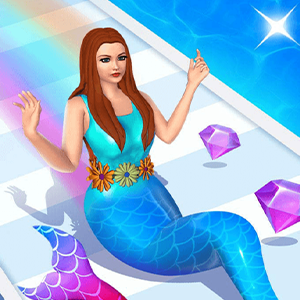
After the illustrated opening screen, the game shows a mermaid from behind on a narrow, striped runway. Purple gems appear along the course, and a gem counter sits in the upper-right corner. A hand-and-arrow prompt across the character shows a side-to-side gesture.
The counter changed during the observed run as gems appeared along the route. This is an endless-run style view in the session we checked; we did not reach a final finish line or verify later levels.
KEEP TO THE RUNWAY
Stay on the path and collect visible gems
The immediate task is to steer the mermaid across the runway toward the purple gems while keeping her on the track. The camera advances down the course automatically in the session observed, so the decision is where to move rather than when to make the character run.
One test drag led to an end-of-attempt panel before a complete course could be established. Treat the visible gems and current counter as feedback from that run; the exact scoring, collision, and failure rules remain unverified.
SIDE-TO-SIDE GESTURE
Drag horizontally to change lanes
The opening gameplay prompt shows a horizontal double arrow and a hand beside the mermaid. A left-to-right drag on the game canvas was the input used in this check. Keep the gesture horizontal and make a small adjustment toward the next visible gem or open section of track.
Keyboard controls and touch-device behavior were not separately tested. On desktop, click or drag inside the game frame; on a phone, follow the control prompt and confirm the game has focus before swiping.
START WITH ONE GESTURE
Begin, steer, then inspect the result
Click the opening artwork to enter the run. Once the track appears, use the hand-and-arrow prompt to make a short horizontal drag, then watch both the mermaid and the gem counter to see how the move affected the run.
The observed attempt ended on a panel with a video-reward button and an orange X. Closing that panel returned directly to a new run. A later run advanced the gem counter and reached a gift-selection screen; this guide does not claim that the gifts are guaranteed rewards or that every run reaches that screen.
OPTIONAL VIDEO REWARDS
Use the close or restart control to keep playing
End-of-run screens can include a video icon. We did not select any video-reward control. On the observed result panel, closing it with the orange X returned to gameplay. Read the button label and video icon before selecting an option so a normal restart is not confused with a rewarded-ad choice.
The amount of gems needed for later screens, the full gift-selection rules, and any collision bonus have not been verified. Use only the values visible in your own run.